

Weight Loss Tracker Feature Design

Role
UX designer
Researcher
Duration
5 days
Tools
Figma, Figjam
01 | Overview & goal
Redesigning a weight loss tracker
This project was the result of a design take-home challenge for a real healthcare startup (name omitted for privacy). The company helps people through their weight loss journey by connecting them with licensed doctors and certified nutritionists and, when it's medically appropriate, giving them access to weight loss medication.
I was asked to design a weight tracking feature for their mobile app. The goal wasn't just to let people log a number, but to help them stay engaged through the journey.
02 | Research
Digging into the research
Secondary research: A study from Oxford's Translational Behavioral Medicine journal on self monitoring and weight loss, explained that people who track their weight in apps tend to lose more, especially when they're consistent about logging meals.
User insights from video reviews: I also pulled insight from 4 real users through YouTube reviews of similar products. A few patterns stood out:
Some people got discouraged when progress was slow on their initial dose
Appetite loss was common when taking medication, and peousersple used this time to build healthier habits
Weight loss medication side effects ranged from mild to severe
Everyone valued having access to medical experts
People who saw the most success from the medication also adjusted their diets
Competitive audit: MyFitnessPal and Lose It, two of the bigger players in this space, both lean heavily on user entered data and don't connect their users with medical professionals. This was an opportunity for my design to differentiate itself.
03 | Interview
Interviewing people
Interviews: I talked to 5 subjects directly and got a clearer sense of their habits

04 | Insights
What the research told me
Putting all of that together, the key priorities became:
Provide multiple options to see progress instead of just numbers
Make food and weight tracking frictionless (encourages habit formation)
Add an AI-integrated meal log that facilitates inputting daily nutrition intake
Facilitate in-app communications with doctors and nutritionists
Allow users to keep an in-app symptom log shared with their doctors
05 | Design
From insights to ideas
I sketched my ideas for each page and feature, then narrowed those down into a low-fidelity wireframe.

06 | Design
Building the high fidelity concept
The high-fidelity mockup that included:
Visible goals (weight & calories) pre-set by the user's nutritionist and doctor, so the goals stay realistic and achievable
A dashboard showing personal progress, with quick access to key functions (food log/weight update/ reports to doctor and nutritionist

07 | Refining
Making logging actually frictionless
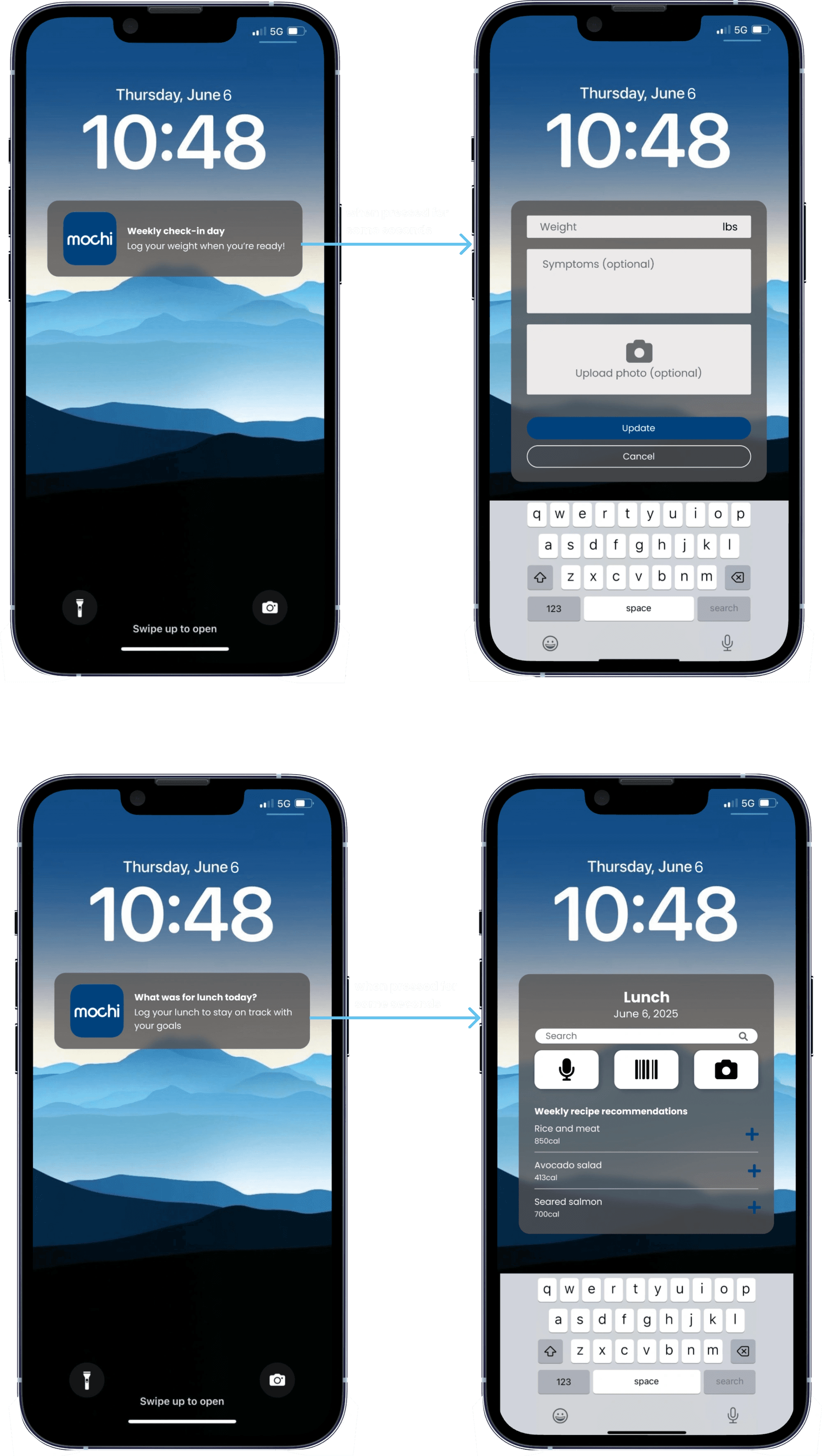
The current product interface requires users to go into the app, go into the log feature, and then enter their weight and food updates.
To cut down on the number of steps, this iteration takes advantage of Apple's Quick Actions functions, allowing users to get notifications prompting them to log new information and quickly input the information without needing to go into the app.
09 | Next steps
Where this goes next
Since this was a 5-day sprint, there's still a lot of work that needs to be done:
Sit down with a development team to check feasibility, especially around the notification quick actions
Build a working prototype and test it with real users to see what works and what doesn't
Run A/B testing to see if the new designs actually impact user journeys and habit formation


